These are simple and detailed notes for Class 10 AI Unit 6: Natural Language Processing (NLP). In this unit, you learn how computers understand human language. You will study the stages of NLP, chatbots, text normalisation, Bag of Words, and TFIDF. You will also do a sentiment analysis project in Orange.
Good to know: You met NLP as one of the three AI domains in Class 9 Unit 1. Here we study how it really works, step by step.
Natural Language Processing Class 10 AI Notes (Unit 6)
What Is Repeated and What Is New?
| Topic | Status | Where to Read |
|---|---|---|
| NLP as an AI domain, and Google Translate as an example | Revision | Class 9 Unit 1 |
| Text as data, and chatbots like ChatGPT | Revision | Class 9 Unit 4 |
| AI Project Cycle and Orange tool | Revision | Class 10 Unit 4 |
| Accuracy, precision, recall, F1 | Revision | Class 10 Unit 3 |
| Features of natural languages | New | This page |
| Applications of NLP | New (detailed) | This page |
| 5 stages of NLP | New | This page |
| Script bots and smart bots | New | This page |
| Text normalisation, Bag of Words, TFIDF | New | This page |
| Sentiment analysis case walkthrough | New | This page |
What Is Natural Language Processing?
A natural language is a language that humans use, like Hindi, English, or Tamil. Natural Language Processing (NLP) is the part of AI that helps computers understand, process, and use human language, both written and spoken.
Computers understand only numbers (0s and 1s). Human language is full of grammar, slang, jokes, and hidden meanings. NLP is the bridge between the two.
Applications of NLP
- Voice assistants: Siri, Alexa, and Google Assistant understand what you say and reply.
- Auto-generated captions: Videos get captions automatically from the speech.
- Language translation: Tools like Google Translate change text from one language to another.
- Sentiment analysis: Finding out if a review or comment is positive, negative, or neutral.
- Text classification: Sorting text into groups, like spam and not spam, or news by topic.
- Keyword extraction: Pulling out the most important words from a long text.
- Automatic summarisation: Making a short summary of a long article.
Activity (from the syllabus): Try keyword extraction with the Google Cloud Natural Language demo. Paste in a paragraph and see which words it finds important.
Features of Natural Languages
Natural languages are easy for humans, but hard for computers. Two ideas help us understand why.
- Syntax: The rules of grammar. It is about the arrangement of words in a sentence.
- Semantics: The meaning of words and sentences.
Why Language Is Hard for Computers
- The arrangement of words matters. “The dog bit the man” and “The man bit the dog” use the same words. But the meanings are very different.
- One word can have many meanings. The word “bank” can mean a place for money or the side of a river. “Light” can mean not heavy, or not dark. The computer must use the context to choose.
- A sentence can have perfect syntax but no meaning. “Colourless green ideas sleep furiously” follows grammar rules, but makes no sense. A computer that checks only grammar would accept it.
Other challenges are slang, spelling mistakes, sarcasm (“Great, it is raining on my holiday!”), and sentences that can be read in two ways.
Stages of Natural Language Processing
NLP works in five stages. Each stage builds on the one before.
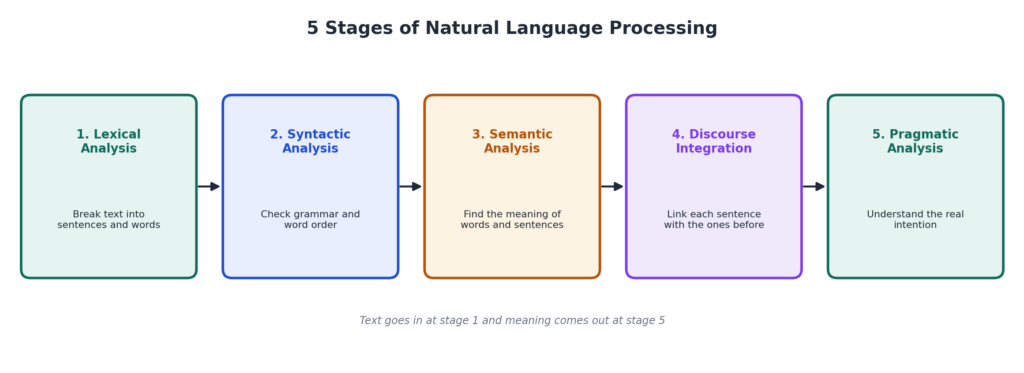
1. Lexical Analysis
The text is broken into small parts: paragraphs, sentences, and words. A lexicon is the collection of all words and phrases of a language. This stage uses it to identify each word.
2. Syntactic Analysis (Parsing)
The computer checks the grammar. It checks how the words are arranged and how they relate to each other. Sentences with wrong grammar are rejected.
3. Semantic Analysis
The computer checks the meaning of every word and phrase. It makes sure the sentence is meaningful. A sentence like “The table drinks tea” is flagged here, even though its grammar is fine.
4. Discourse Integration
The meaning of a sentence often depends on the sentences before and after it. This stage links them to build the full story. For example, in “Aman is hungry. He ordered pizza.” the word “He” refers to Aman.
5. Pragmatic Analysis
The computer works out the real intention behind the words, using common sense and the situation. For example, when someone says “Can you pass the salt?”, they are not asking if you are able to. They are making a request.
| Stage | Main Job | Example |
|---|---|---|
| Lexical | Split text into sentences and words | “Raj ate rice.” becomes Raj, ate, rice |
| Syntactic | Check grammar and word order | “Ate Raj rice” has the wrong order |
| Semantic | Check the meaning | “The table drinks tea” has no real meaning |
| Discourse | Link sentences together | “He” means Aman |
| Pragmatic | Find the true intention | “Can you pass the salt?” is a request |
Chatbots
A chatbot is a program that talks with people using text or voice. You see chatbots on shopping sites, banks, and phone company apps. There are two kinds: script bots and smart bots.
| Script Bot | Smart Bot |
|---|---|
| Works from a fixed script. It gives pre-written replies. | Learns from a large amount of data. |
| Easy to make. | Harder to make. It needs coding and training. |
| Little or no language processing. | Uses NLP to understand your message. |
| Limited. It fails if you ask something outside the script. | Flexible. It can handle a wide range of questions. |
| Example: A simple “Press 1 for balance” menu bot. | Example: Google Assistant, and modern AI chatbots. |
Activity: Play With Chatbots
The syllabus suggests trying these bots:
Talk to each one. Then answer these questions: Which bot felt the most human? Which one gave the same kind of reply again and again? Which one failed when you asked something unusual? Based on this, decide which bots are script bots and which are smart bots.
Modern AI chatbots, like ChatGPT, are generative AI. Read about them in Class 9 Unit 4.
Text Processing
A computer cannot use raw text directly. First we must clean it and make it simpler. Then we turn it into numbers. This is called text processing. It has two parts: text normalisation, and then converting the text into numbers using Bag of Words and TFIDF.
Text Normalisation
Text normalisation means cleaning the text and bringing it to a simple form. The set of all the text we are using is called the corpus.
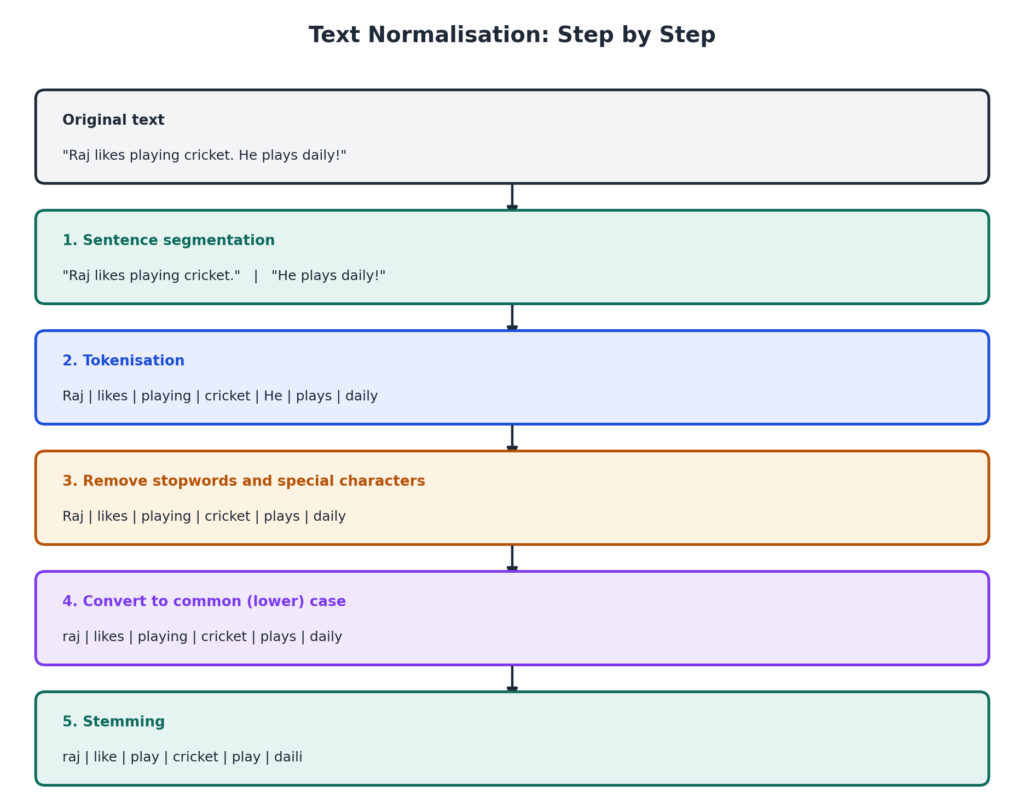
Step 1: Sentence Segmentation
Divide the whole corpus into separate sentences.
Step 2: Tokenisation
Break each sentence into separate words. Each word, number, or symbol is called a token.
Step 3: Remove Stopwords, Special Characters and Numbers
Stopwords are common words that are needed for grammar but add very little meaning, like a, an, the, is, are, and, to, of, he, she, it. We remove them, along with special characters (like ! ? , .) and numbers, when they are not needed.
Step 4: Convert Text to a Common Case
Change all letters to lower case. This way, “Cricket” and “cricket” are treated as the same word.
Step 5: Stemming or Lemmatization
Reduce words to their root form.
- Stemming: Cuts off the ends of words using simple rules. It is fast, but the result may not be a real word.
- Lemmatization: Uses a dictionary to find the proper base word (the lemma). It is slower, but the result is always a meaningful word.
| Word | After Stemming | After Lemmatization |
|---|---|---|
| healing | heal | heal |
| studies | studi | study |
| flies | fli | fly |
Note: Stemming can give odd words like “studi”, but lemmatization gives “study”. That is the key difference.
Bag of Words
After normalisation, we must turn the words into numbers. Bag of Words (BoW) is a simple NLP model that does this. It is called a “bag” because the order of words does not matter. It only counts how many times each word occurs.
Bag of Words gives us two things:
- A vocabulary: the list of all unique words in the corpus.
- The frequency (count) of each word in each document.
Steps of Bag of Words
- Text normalisation: Clean each document, as shown above.
- Create the vocabulary: List every unique word from all documents.
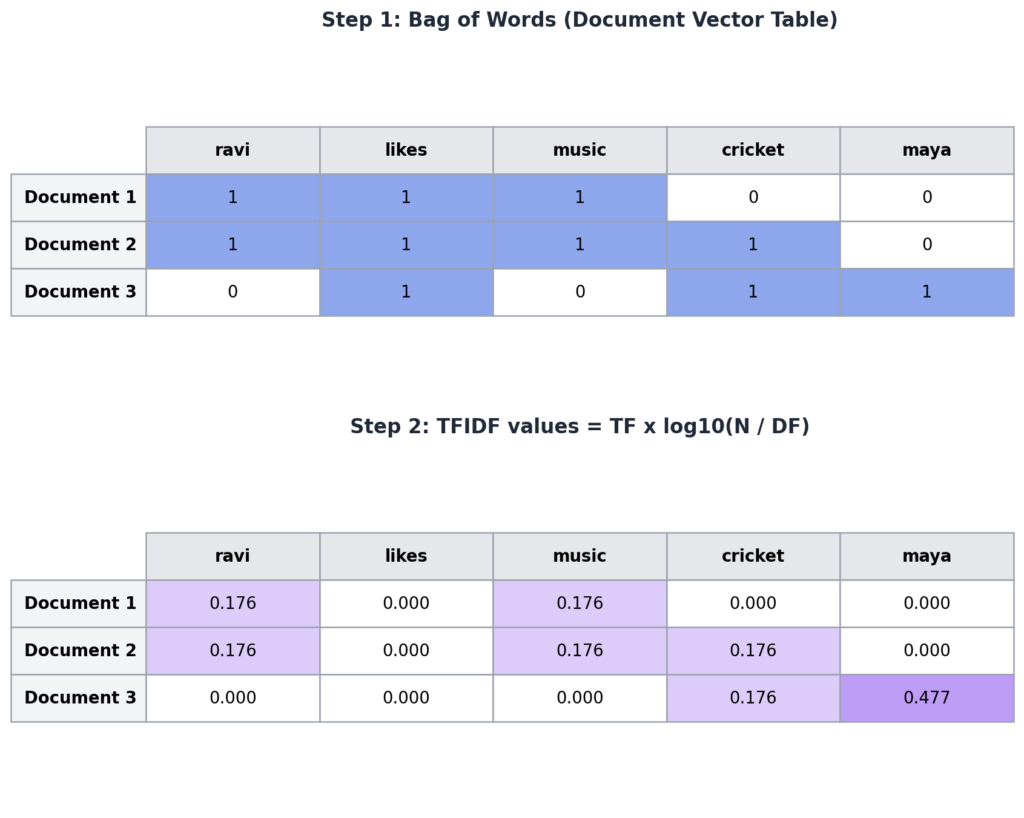
- Create the document vector table: For each document, write how many times each vocabulary word appears.
Example. Three documents (already normalised):
- Document 1: ravi likes music
- Document 2: ravi likes cricket music
- Document 3: maya likes cricket
Vocabulary: ravi, likes, music, cricket, maya (5 unique words).
TFIDF
Bag of Words counts words, but it has a problem. Words like “likes” may appear in every document. They get a high count, but they do not help us tell the documents apart. TFIDF fixes this. It stands for Term Frequency and Inverse Document Frequency. It gives each word a score based on how important it is.
- Term Frequency (TF): How many times a word appears in one document. We read it from the document vector table.
- Document Frequency (DF): In how many documents the word appears.
- Inverse Document Frequency (IDF): Total number of documents (N) divided by the document frequency. IDF = N ÷ DF.
TFIDF(W) = TF(W) × log( N ÷ DF(W) )
Note: CBSE books write this as TF(W) × log(IDF(W)), where IDF(W) = N ÷ DF(W). It is the same thing. We use log to base 10.
Solved Example
Using the three documents above, N = 3. The document frequencies are: ravi = 2, likes = 3, music = 2, cricket = 2, maya = 1.
| Word | DF | N ÷ DF | log10(N ÷ DF) |
|---|---|---|---|
| ravi | 2 | 1.5 | 0.176 |
| likes | 3 | 1 | 0 |
| music | 2 | 1.5 | 0.176 |
| cricket | 2 | 1.5 | 0.176 |
| maya | 1 | 3 | 0.477 |
Now multiply each TF by this value. The document vector table and the final TFIDF values are shown here:
How to Read the Result
- The word “likes” appears in all documents. Its TFIDF is 0. So it is not useful, and acts like a stopword.
- The word “maya” appears in only one document. Its TFIDF is the highest (0.477). It is the most special word.
- A word has a high TFIDF when it appears many times in one document (high TF), but in few documents overall (low DF).
- A word that appears in every document, even many times, gets a very low or zero score.
Uses of TFIDF
- Finding the important words (keywords) in a document.
- Removing stopwords automatically.
- Search engines, to rank pages for a search.
- Text classification and document comparison.
Case Walkthrough: Sentiment Analysis With Orange
Sentiment analysis finds out if a piece of text is positive, negative, or neutral. Businesses use it to understand what customers feel from thousands of reviews.
Stage 1: Problem Scoping
| 4Ws | Answer |
|---|---|
| Who | A business owner, such as a restaurant or an online shop. |
| What | There are too many customer reviews to read one by one. |
| Where | On review websites, apps, and social media. |
| Why | To quickly see what customers like and dislike, and improve the service. |
Stage 2: Data Acquisition
Collect reviews. Each review is text. For supervised learning, each review should be labelled as positive or negative. Use the dataset given in the CBSE folder linked in your syllabus.
Stage 3 to 5: Exploration, Modelling and Evaluation in Orange
- Install the Text add-on in Orange (Options > Add-ons).
- Load the reviews with the Corpus widget.
- Clean the text with Preprocess Text. Here you choose lowercase, tokenisation, stopword removal, and stemming or lemmatization. These are the text normalisation steps you learned above.
- Look at the common words with a Word Cloud.
- Turn the text into numbers with the Bag of Words widget. It can use counts or TFIDF.
- Train a model, such as Logistic Regression, and check it with Test and Score and Confusion Matrix. See Unit 3.
Stage 6: Deployment
Use the Predictions widget to label new reviews. The owner can then see how many reviews are positive or negative.
Note: Orange also has a ready Sentiment Analysis widget. The exact widgets and steps in the CBSE Drive folder may differ a little. Follow your teacher’s steps for the practical.
Ethics in NLP
- Bias in language: If the training text contains unfair ideas about a group, the model may repeat them.
- Privacy: Messages, voice recordings, and chats are personal. They must be protected, and used only with permission.
- Fake and harmful text: NLP can be misused to produce fake news, spam, or scam messages.
- Language inclusion: Many tools work best for English. Speakers of other languages may get worse service. Good AI should work for everyone.
Read more about ethics in Class 10 Unit 1.
Tips for Practical Exam and Viva
- Practise text normalisation by hand on a short corpus of 2 or 3 sentences.
- Practise building a Bag of Words table and calculating TFIDF for a small example.
- Know the order of the 5 NLP stages, and one example for each.
- Practise the Orange sentiment analysis workflow, and take screenshots for your practical file.
Likely Viva Questions
- What is NLP? The part of AI that helps computers understand and process human language.
- What is a corpus? The collection of all the text used in a project.
- What is a token? A single word or symbol produced by tokenisation.
- What are stopwords? Common words like “the” and “is” that add little meaning.
- Difference between stemming and lemmatization? Stemming cuts word endings and may give non-words. Lemmatization gives real base words.
- What does Bag of Words ignore? The order of words.
- What does a high TFIDF value mean? The word is important in that document.
- What is sentiment analysis? Finding whether text is positive, negative, or neutral.
Quick Revision Points
- NLP helps computers understand human language.
- Syntax is grammar. Semantics is meaning.
- 5 stages: Lexical, Syntactic, Semantic, Discourse Integration, Pragmatic.
- Script bots follow a script. Smart bots learn and use NLP.
- Text normalisation: sentence segmentation, tokenisation, remove stopwords, common case, stemming or lemmatization.
- Bag of Words gives a vocabulary and word counts. It ignores word order.
- TFIDF = TF × log(N ÷ DF). Common words get a low score. Rare, special words get a high score.
Practice: Solve These Numericals
- There are 4 documents. The word “data” appears in 2 of them. In one document, it appears 3 times. Find its TFIDF there.
Answer: log10(4 ÷ 2) = 0.301. TFIDF = 3 × 0.301 = 0.903. - A word appears in all 5 documents, 4 times in one of them. Find its TFIDF.
Answer: log10(5 ÷ 5) = log10(1) = 0. So TFIDF = 0. - There are 10 documents. A word appears in only 1 of them, 2 times. Find its TFIDF.
Answer: log10(10 ÷ 1) = 1. TFIDF = 2 × 1 = 2.
Multiple Choice Questions
Q1. NLP stands for:
a) Natural Language Processing b) New Learning Program c) Network Language Protocol d) Natural Logic Process
Answer: a) Natural Language Processing
Q2. Which of these is an example of NLP?
a) Face unlock b) Google Translate c) A calculator d) A thermostat
Answer: b) Google Translate
Q3. Finding out whether a review is positive or negative is called:
a) Text classification only b) Sentiment analysis c) Tokenisation d) Stemming
Answer: b) Sentiment analysis
Q4. The rules of grammar of a language are called its:
a) Semantics b) Syntax c) Lexicon d) Corpus
Answer: b) Syntax
Q5. The meaning of words and sentences is called:
a) Syntax b) Semantics c) Token d) Stem
Answer: b) Semantics
Q6. “Colourless green ideas sleep furiously” shows a sentence with:
a) Wrong syntax and clear meaning b) Perfect syntax but no meaning c) Wrong syntax and no meaning d) Perfect syntax and perfect meaning
Answer: b) Perfect syntax but no meaning
Q7. Which is the first stage of NLP?
a) Semantic analysis b) Pragmatic analysis c) Lexical analysis d) Discourse integration
Answer: c) Lexical analysis
Q8. Which stage checks the grammar of sentences?
a) Lexical b) Syntactic c) Semantic d) Pragmatic
Answer: b) Syntactic
Q9. Which stage finds the meaning of words and sentences?
a) Syntactic b) Semantic c) Lexical d) Discourse integration
Answer: b) Semantic
Q10. Which stage links a sentence with the sentences before it?
a) Discourse integration b) Lexical c) Syntactic d) Semantic
Answer: a) Discourse integration
Q11. Which stage understands the real intention behind the words?
a) Lexical b) Syntactic c) Pragmatic d) Semantic
Answer: c) Pragmatic
Q12. A bot that gives only pre-written replies is a:
a) Smart bot b) Script bot c) Neural bot d) Deep bot
Answer: b) Script bot
Q13. Which bot learns from a large amount of data and uses NLP?
a) Script bot b) Smart bot c) Both d) None
Answer: b) Smart bot
Q14. The collection of all text used in a project is called a:
a) Token b) Corpus c) Stem d) Vector
Answer: b) Corpus
Q15. Breaking a sentence into words is called:
a) Stemming b) Tokenisation c) Lemmatization d) Sentence segmentation
Answer: b) Tokenisation
Q16. Which of these is a stopword?
a) cricket b) the c) music d) Delhi
Answer: b) the
Q17. Why do we convert all text to lower case?
a) To make it longer b) So that “Cricket” and “cricket” are treated as the same word c) To add numbers d) To remove tokens
Answer: b) So that “Cricket” and “cricket” are treated as the same word
Q18. Which process always gives a meaningful base word, using a dictionary?
a) Stemming b) Lemmatization c) Tokenisation d) Segmentation
Answer: b) Lemmatization
Q19. Stemming “studies” using simple rules may give:
a) study b) studi c) student d) studies
Answer: b) studi
Q20. Bag of Words ignores:
a) The count of words b) The order of words c) The vocabulary d) The documents
Answer: b) The order of words
Q21. Bag of Words gives us a vocabulary and:
a) The grammar b) The frequency of words c) The meaning d) The intention
Answer: b) The frequency of words
Q22. TFIDF stands for:
a) Term Frequency and Inverse Document Frequency b) Text Format and Index Data File c) Token Filter and Inverse Data Format d) Term Filter in Document Frequency
Answer: a) Term Frequency and Inverse Document Frequency
Q23. A word that appears in every document will have a TFIDF value that is:
a) Very high b) Very low or zero c) Always 1 d) Negative infinity
Answer: b) Very low or zero
Q24. A word has a high TFIDF value when it has:
a) High TF and low DF b) Low TF and high DF c) High TF and high DF d) Zero TF
Answer: a) High TF and low DF
Assertion and Reason Questions
Choices: (a) Both A and R are true and R explains A. (b) Both A and R are true but R does not explain A. (c) A is true but R is false. (d) A is false but R is true.
Q25. Assertion (A): Stopwords are usually removed in text normalisation.
Reason (R): Stopwords appear very often but add little meaning.
Answer: (a) Both are true, and R explains A.
Q26. Assertion (A): Bag of Words keeps the order of words in a sentence.
Reason (R): Bag of Words only counts how many times each word appears.
Answer: (d) A is false, because Bag of Words ignores word order. R is true.
Case-Based Question
A shop owner reads three customer reviews after normalisation:
Review 1: “food tasty service slow”
Review 2: “food cold service slow”
Review 3: “food tasty staff polite”
- Name two ways in which the text was normalised before this. Answer: Lower case conversion and removal of stopwords and punctuation.
- Write the vocabulary. Answer: food, tasty, service, slow, cold, staff, polite.
- Which word has the highest TFIDF value, and why? Answer: The words “cold”, “staff”, and “polite” each appear in only one review, so they have the highest value. The word “food” appears in all three reviews, so its TFIDF is 0.
- Which NLP task is the owner doing? Answer: Sentiment analysis of reviews.
Short Answer Questions
- What is NLP? Give two applications.
- What is the difference between syntax and semantics?
- Give two reasons why human language is difficult for computers.
- Name the five stages of NLP.
- Explain discourse integration with an example.
- Differentiate between a script bot and a smart bot.
- What is text normalisation? Name its steps.
- What are stopwords? Give three examples.
- Differentiate between stemming and lemmatization, with an example.
- What is Bag of Words? What two things does it give?
- What is TFIDF? Write its formula.
- What is sentiment analysis? Give one use.
Long Answer Questions
- Explain the five stages of Natural Language Processing with an example for each.
- Explain the steps of text normalisation with a short example text.
- Explain the Bag of Words algorithm. Create a document vector table for the documents: “ravi likes music”, “maya likes cricket”.
- Explain TFIDF. How is it different from Bag of Words? Calculate the TFIDF of a word with TF = 2 that appears in 1 of 4 documents. (Answer: 2 × log10(4) = 2 × 0.602 = 1.204.)
- Explain how a sentiment analysis project can be done in Orange, stage by stage, using the AI Project Cycle.
Keep Learning
You have finished Unit 6. The last unit is Advance Python, where you will write programs for the practical file (coming soon). To revise how models are tested, read Unit 3. For all units, visit the Class 10 AI Notes page.