These are simple and detailed notes for Class 10 AI Unit 5: Computer Vision. In this unit, you learn how a computer “sees” pictures. You will study pixels, colours, the convolution operator, and Convolutional Neural Networks (CNN). You will also use no-code tools to build your own image model.
Good to know: You met Computer Vision as one of the three AI domains in Class 9 Unit 1. You also learned about CNN and neural networks in Class 10 Unit 2. Here we go deeper into how it really works.
Computer Vision Class 10 AI Notes (Unit 5)
What Is Repeated and What Is New?
| Topic | Status | Where to Read |
|---|---|---|
| Computer Vision as an AI domain | Revision | Class 9 Unit 1 |
| Neural networks and CNN (basic idea) | Revision | Class 10 Unit 2 |
| Orange tool, AI Project Cycle in no-code tools | Revision | Class 10 Unit 4 |
| Accuracy, confusion matrix | Revision | Class 10 Unit 3 |
| Applications and tasks of Computer Vision | New | This page |
| Pixels, resolution, grayscale, RGB | New | This page |
| Image features, kernel, convolution operator | New | This page |
| CNN layers: Convolution, ReLU, Pooling, Fully Connected | New (detailed) | This page |
| Lobe, Teachable Machine, Coral Bleaching case study | New | This page |
What Is Computer Vision?
Computer Vision (CV) is the part of AI that helps computers see, understand, and make sense of images and videos. Humans do this easily with their eyes and brain. A computer needs special methods to do the same.
How Does a Computer “See”?
- The camera takes a picture.
- The computer turns the picture into numbers. Each tiny dot of the picture becomes a number.
- The AI model looks for patterns in these numbers, like edges, shapes, and colours.
- Based on the patterns, it decides what is in the picture.
Applications of Computer Vision
- Facial recognition: Unlocking a phone, or marking attendance.
- Face filters: Apps that add effects to your face in real time.
- Search with a photo: Tools like Google Lens that identify objects from a picture.
- Retail and shops: Tracking stock on shelves and counting customers.
- Self-driving cars: Spotting roads, signs, people, and other vehicles.
- Healthcare: Reading X-rays and scans to help doctors.
- Agriculture: Finding diseased plants from photos of leaves.
- Security: Watching camera feeds and spotting unusual activity.
Why Is Computer Vision Hard?
The same object can look very different. Light, angle, distance, and shadows all change how a picture looks. A part of the object may also be hidden behind something. A good CV model must handle all of this.
Tasks of Computer Vision
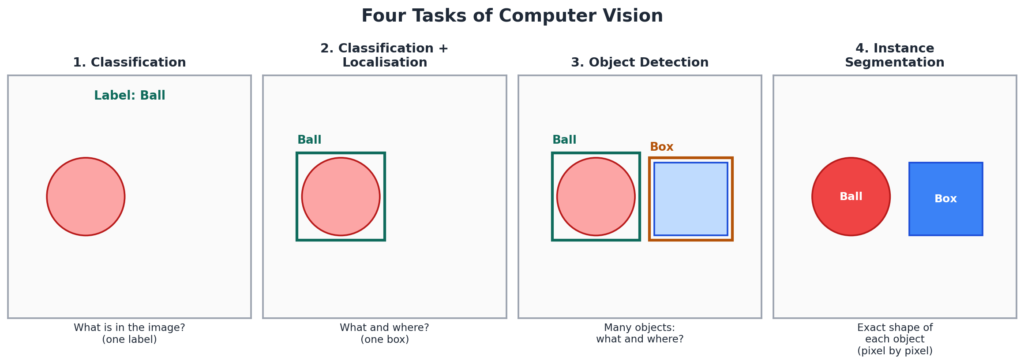
Computer Vision does four main kinds of tasks. They get harder as we go down the list.
| Task | Question It Answers | Output | Example |
|---|---|---|---|
| Classification | What is in the image? | One label for the whole image | “This is a cat.” |
| Classification + Localisation | What is it, and where is it? | A label and one box around the object | A box around the cat labelled “cat”. |
| Object Detection | What are all the objects, and where are they? | Many labels and many boxes | Cars, people, and signs on a road. |
| Instance Segmentation | Which pixels belong to which object? | The exact outline of every object | Colouring each person in a photo with a different colour. |
Basics of Images
Pixel
A pixel (picture element) is the smallest dot of a digital image. A picture is a big grid of pixels. When you zoom in a lot, you can see the small squares.
Resolution
Resolution is the number of pixels in an image, usually written as width × height. More pixels give a sharper picture.
Example: A Full HD image is 1920 × 1080. That is 1920 × 1080 = 2,073,600 pixels, which is about 2 megapixels.
Pixel Value
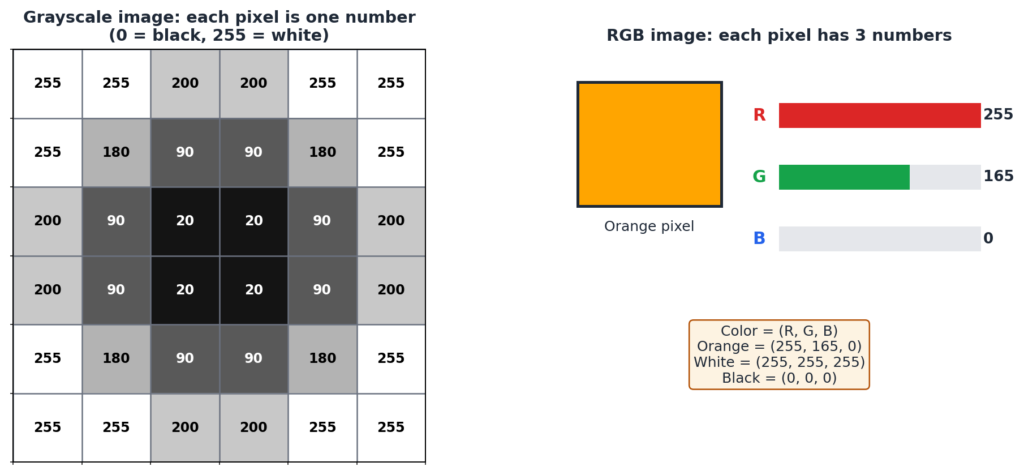
Every pixel stores a number called its pixel value. In most images, this number is between 0 and 255. It tells us how bright the pixel is, or what colour it has.
Grayscale Images
A grayscale image has one number per pixel. The value 0 is black. The value 255 is white. Numbers in between are shades of grey. These are the “black and white” photos.
RGB Images
A colour image has three numbers per pixel. They are Red, Green, and Blue. Each goes from 0 to 255. Mixing the three gives any colour. The three sets of numbers are called channels.
| Colour | R | G | B |
|---|---|---|---|
| Black | 0 | 0 | 0 |
| White | 255 | 255 | 255 |
| Red | 255 | 0 | 0 |
| Green | 0 | 255 | 0 |
| Blue | 0 | 0 | 255 |
| Yellow | 255 | 255 | 0 |
| Orange | 255 | 165 | 0 |
Remember: A grayscale image uses one channel. An RGB image uses three channels. So an RGB image holds 3 times more numbers than a grayscale image of the same size.
Activities From the Syllabus
- Emoji Scavenger Hunt: A game where your camera must find real objects that match emojis. It shows a CV model at work. Play here
- RGB Calculator: Change the R, G, and B values and see the colour. Try here
- Pixel Art: Draw your own picture pixel by pixel. Piskel
- Image Kernels: See how kernels change a picture. Try here
Image Features
A feature is a useful pattern in an image, like an edge, a corner, a line, or a texture. A CV model cannot understand a whole picture at once. It first finds small features, and then joins them to understand bigger things.
For example, edges and curves join to make an eye. Two eyes, a nose, and a mouth join to make a face.
The tool used to find features is called a kernel, and the method is called convolution.
Convolution Operator and Kernel
What Is a Kernel?
A kernel (also called a filter) is a small grid of numbers, like 3 × 3. It slides over the image. Different kernels find different features, such as edges or blurs.
What Is Convolution?
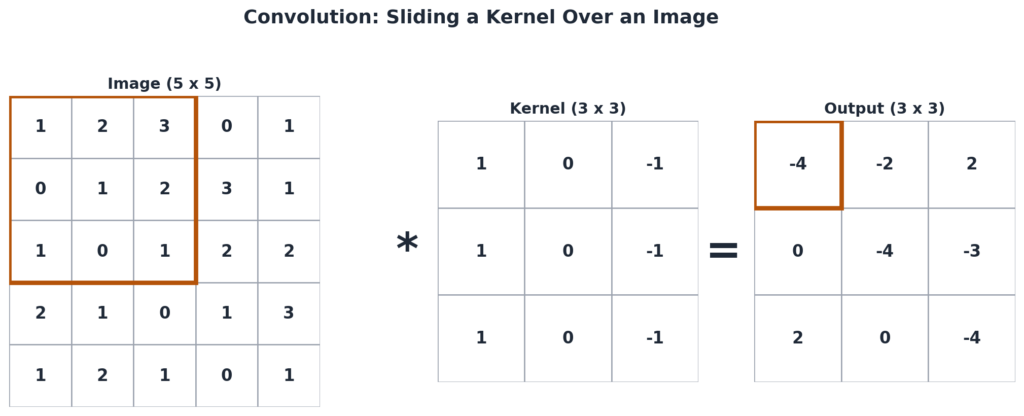
Convolution is the process of sliding the kernel over the image. At each spot, we do two things:
- Multiply each kernel number with the image number below it.
- Add all the products together. This gives one number of the output.
The output is a new, smaller image. It is called a feature map.
Worked example (first output value):
The kernel sits on the top-left 3 × 3 part of the image.
Image part: 1 2 3 / 0 1 2 / 1 0 1.
Kernel: 1 0 −1 / 1 0 −1 / 1 0 −1.
Multiply each pair and add:
(1×1) + (2×0) + (3×−1) = −2
(0×1) + (1×0) + (2×−1) = −2
(1×1) + (0×0) + (1×−1) = 0
Total = −2 + −2 + 0 = −4.
Then the kernel moves one step to the right and repeats. After covering the whole image, the output is a 3 × 3 grid: −4, −2, 2 / 0, −4, −3 / 2, 0, −4.
Why Is the Output Smaller?
The kernel needs a full 3 × 3 patch to work on. So it cannot sit on the very edge rows and columns. That is why a 5 × 5 image gives a 3 × 3 output. (Some methods add a border of zeros, called padding, to keep the size the same.)
What Do Kernels Do?
| Kernel Type | Effect |
|---|---|
| Edge detection | Highlights the outlines of objects. |
| Blur | Makes the picture smooth and soft. |
| Sharpen | Makes details look clearer. |
You can test these on the image kernels website.
Convolutional Neural Network (CNN)
A CNN is a deep learning model made for images. It is a neural network (see Class 10 Unit 2) that uses convolution to find features. It is the main model used in Computer Vision today.
In a normal edge-detection kernel, a human picks the numbers. In a CNN, the kernel numbers are learned from data during training, just like the weights of a neural network.
Layers of a CNN
1. Convolution Layer
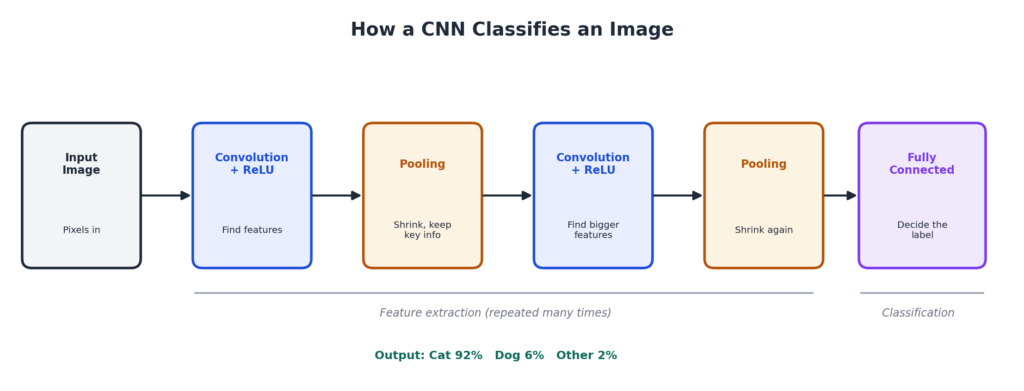
This is the main building block. It uses many kernels to find features in the image, and creates feature maps. The first layers find simple features like edges and lines. Deeper layers find complex features like eyes, wheels, or text. A CNN can have many convolution layers.
2. ReLU Layer (Rectified Linear Unit)
ReLU is a simple rule applied to the feature map. It changes all negative numbers to 0 and keeps positive numbers as they are. It helps the network learn complex patterns.
Example: Input: −3, 5, −1, 8. After ReLU: 0, 5, 0, 8.
3. Pooling Layer
Pooling makes the feature map smaller, but keeps the most important information. This makes the network faster. There are two common types:
- Max pooling: Picks the largest value in each small block.
- Average pooling: Takes the average of each small block.
Example with 2 × 2 blocks: A 4 × 4 map:
1 3 2 4 / 5 6 1 2 / 7 2 9 0 / 3 4 1 8
Max pooling gives: 6 4 / 7 9.
Average pooling gives: 3.75 2.25 / 4 4.5.
4. Fully Connected Layer
This is the last layer. It takes all the features found by the earlier layers, and uses them to decide the final answer, such as “cat” or “dog”. The output is often a score for each possible label.
How a CNN Works: Summary
- The image goes in as pixel numbers.
- Convolution and ReLU find features.
- Pooling shrinks the data.
- These steps repeat several times.
- The fully connected layer gives the final label.
No-Code AI Tools for Computer Vision
You can build CV models without writing any code. This uses the same AI Project Cycle that you studied in Unit 1.
1. Teachable Machine
Teachable Machine is a free Google website. You train a model using your webcam or uploaded files. It can work with images, sounds, and body poses.
Steps:
- Open the site and choose a new Image Project.
- Make one class for each group (for example, “Paper”, “Plastic”, “Metal”).
- Add many sample photos to each class, using the webcam or uploads.
- Click Train Model.
- Test it with the preview. Show new objects and see the prediction.
- If needed, add more samples and train again.
Activity: Build a Smart Sorter
A smart sorter is a model that sorts items into groups. A fun idea is a waste sorter that tells if an item is paper, plastic, or metal. Train a model with Teachable Machine, with one class for each type. Test it with new items. Then check where it makes mistakes, and add more samples to fix them. This is a supervised, classification task. (See Unit 2.)
2. Lobe
Lobe is a no-code tool for image classification. You give it labelled images. It automatically finds a good model, trains it, and lets you test it. It is an “Auto-ML” tool. Check the Lobe website for its latest status and download steps.
3. Orange Data Mining
You used Orange in Unit 4 for numbers. With its Image Analytics add-on, it can also work with images. You will use it in the Coral Bleaching case study.
Case Study: Early Detection of Coral Bleaching
This is the use-case walkthrough in the syllabus. The goal is to build a model that looks at a coral photo and says if the coral is healthy or bleached.
What is coral bleaching? Corals get their colour from tiny algae that live in them. When the sea becomes too warm, the corals push out the algae and turn white. This is called bleaching. Bleached corals can die if the stress continues.
Stage 1: Problem Scoping
| 4Ws | Answer |
|---|---|
| Who | Marine scientists, coral reef workers, and people who depend on the reef. |
| What | Corals are bleaching and dying, and checking each reef by hand is slow. |
| Where | Coral reefs in warm seas. |
| Why | Early detection can help protect reefs, fish, and local livelihoods. |
Stage 2: Data Acquisition
Collect many photos of healthy corals and bleached corals. Each photo is labelled “healthy” or “bleached”. Use the image dataset given in the CBSE folder linked in your syllabus.
Stage 3: Data Exploration
Look at the images. Check that both classes have enough photos, and that the photos are clear. A big imbalance can cause a biased model.
Stage 4: Modelling (in Orange)
- Install the Image Analytics add-on in Orange (Options > Add-ons).
- Use the Import Images widget to load the photos.
- Use Image Viewer to see them.
- Use Image Embedding to turn each image into a set of numbers, using a ready-made deep learning model.
- Connect a learner, such as Logistic Regression or kNN.
Stage 5: Evaluation
Use Test and Score to see accuracy, precision, recall, and F1. Use Confusion Matrix to see the mistakes. Think about which metric matters most. Missing a bleached coral (a false negative) is more costly, so recall is important. See Unit 3.
Stage 6: Deployment
Use the Predictions widget on new coral photos. Scientists can then use the model to scan large numbers of reef photos quickly.
Note: The exact widgets and steps in the CBSE Drive folder may differ a little. For your practical, follow your teacher’s steps and dataset.
Ethics in Computer Vision
- Privacy: Cameras and face recognition can record people without their knowledge. Always ask for permission.
- Bias: If the training photos mostly show some groups, the model may fail on others. For example, a face model may work badly for some skin tones.
- Misuse: CV can be used to make fake images and videos (deepfakes). See Class 9 Unit 4.
- Safety: In self-driving cars or medical scans, a wrong result can harm people. Test very carefully.
Tips for Practical Exam and Viva
- Practise Teachable Machine until you can train a model in a few minutes.
- Be able to do a small convolution by hand on a 5 × 5 image with a 3 × 3 kernel.
- Know the four CNN layers and what each does.
- Take screenshots of your model and test results for your practical file.
Likely Viva Questions
- What is a pixel? The smallest dot of a digital image.
- What is the range of a pixel value? 0 to 255.
- How many channels does an RGB image have? Three: red, green, and blue.
- What is a kernel? A small grid of numbers that slides over an image to find features.
- What does ReLU do? It changes negative values to 0.
- What does pooling do? It shrinks the feature map and keeps key information.
- Which layer gives the final label? The fully connected layer.
- What is Teachable Machine? A no-code Google tool to train image, sound, and pose models.
Quick Revision Points
- Computer Vision helps computers understand images and videos.
- Four tasks: Classification, Classification + Localisation, Object Detection, Instance Segmentation.
- A pixel is the smallest part of an image. Pixel values go from 0 to 255.
- Grayscale has 1 channel. RGB has 3 channels.
- A kernel slides over the image. Convolution multiplies and adds to make a feature map.
- CNN layers: Convolution, ReLU, Pooling, Fully Connected.
- No-code CV tools: Teachable Machine, Lobe, Orange (with Image Analytics).
- Coral bleaching case: classify corals as healthy or bleached.
Multiple Choice Questions
Q1. Computer Vision helps a computer to:
a) Hear sounds b) Understand images and videos c) Write code d) Store data
Answer: b) Understand images and videos
Q2. Which CV task gives only one label for the whole image?
a) Classification b) Object detection c) Instance segmentation d) Localisation
Answer: a) Classification
Q3. Which CV task finds many objects and draws a box around each?
a) Classification b) Object detection c) Convolution d) Pooling
Answer: b) Object detection
Q4. Which CV task outlines the exact shape of each object?
a) Classification b) Object detection c) Instance segmentation d) Pooling
Answer: c) Instance segmentation
Q5. The smallest unit of a digital image is a:
a) Kernel b) Pixel c) Layer d) Channel
Answer: b) Pixel
Q6. The usual range of a pixel value is:
a) 0 to 1 b) 0 to 10 c) 0 to 255 d) 0 to 1000
Answer: c) 0 to 255
Q7. In a grayscale image, the value 0 means:
a) White b) Black c) Red d) Grey
Answer: b) Black
Q8. How many channels does an RGB image have?
a) 1 b) 2 c) 3 d) 4
Answer: c) 3
Q9. The RGB value (255, 255, 255) gives:
a) Black b) White c) Red d) Blue
Answer: b) White
Q10. The RGB value (255, 0, 0) gives:
a) Red b) Green c) Blue d) Yellow
Answer: a) Red
Q11. A Full HD image has 1920 × 1080 pixels. This number is called its:
a) Kernel b) Resolution c) Channel d) Feature map
Answer: b) Resolution
Q12. A small grid of numbers that slides over an image is called a:
a) Pixel b) Kernel c) Label d) Class
Answer: b) Kernel
Q13. The output of the convolution operation is called a:
a) Feature map b) Dataset c) Label d) Widget
Answer: a) Feature map
Q14. A 5 × 5 image is convolved with a 3 × 3 kernel (no padding). The output size is:
a) 5 × 5 b) 4 × 4 c) 3 × 3 d) 2 × 2
Answer: c) 3 × 3
Q15. CNN stands for:
a) Complex Neural Network b) Convolutional Neural Network c) Connected Node Network d) Computer Neural Net
Answer: b) Convolutional Neural Network
Q16. Which CNN layer changes negative values to 0?
a) Convolution b) ReLU c) Pooling d) Fully connected
Answer: b) ReLU
Q17. Which CNN layer makes the feature map smaller?
a) Convolution b) ReLU c) Pooling d) Input
Answer: c) Pooling
Q18. Max pooling picks the:
a) Smallest value b) Largest value c) Average value d) Middle value
Answer: b) Largest value
Q19. Which layer gives the final label in a CNN?
a) Convolution layer b) Pooling layer c) Fully connected layer d) ReLU layer
Answer: c) Fully connected layer
Q20. Which tool is a no-code tool by Google for training image models in the browser?
a) Teachable Machine b) Python c) Excel d) Piskel
Answer: a) Teachable Machine
Q21. Which of these is an Auto-ML no-code tool for image classification?
a) Lobe b) Notepad c) Word d) Paint
Answer: a) Lobe
Q22. In the coral bleaching case study, bleached corals look:
a) Dark green b) White or pale c) Red d) Blue
Answer: b) White or pale
Assertion and Reason Questions
Choices: (a) Both A and R are true and R explains A. (b) Both A and R are true but R does not explain A. (c) A is true but R is false. (d) A is false but R is true.
Q23. Assertion (A): An RGB image holds more numbers than a grayscale image of the same size.
Reason (R): Each pixel of an RGB image has three values, while a grayscale pixel has one.
Answer: (a) Both are true, and R explains A.
Q24. Assertion (A): Pooling layers increase the size of the feature map.
Reason (R): Pooling keeps the most important information while reducing the size.
Answer: (d) A is false, because pooling reduces the size. R is true.
Case-Based Question
A school builds a waste sorter with Teachable Machine. It has three classes: Paper, Plastic, and Metal. The model works well on the photos it was trained on, but often makes mistakes with new items shown through the webcam.
- Which type of CV task is this? Answer: Classification.
- Why does the model fail on new items? Answer: It may not have enough varied training photos (different angles, light, and objects).
- How can the school improve it? Answer: Add more and varied photos to every class, train again, and test with new items.
- Which tool could they use to see the mistakes in more detail? Answer: A confusion matrix, as in Orange.
Short Answer Questions
- What is Computer Vision? Give two applications.
- Name the four tasks of Computer Vision.
- Differentiate between classification and object detection.
- What is a pixel? What is a pixel value?
- What is resolution? Find the number of pixels in a 1280 × 720 image. (Answer: 921,600.)
- Differentiate between a grayscale image and an RGB image.
- What is a kernel? What does it do?
- What is convolution? What is a feature map?
- Why is the output of convolution smaller than the input?
- What is a CNN? Name its four layers.
- What does the ReLU layer do? Apply ReLU to −2, 4, −7, 9. (Answer: 0, 4, 0, 9.)
- What is pooling? Name its two types.
Long Answer Questions
- Explain the four tasks of Computer Vision with examples.
- Explain pixels, resolution, pixel value, grayscale, and RGB images.
- Explain the convolution operator. Show how the first output value is calculated for a 3 × 3 kernel on a 3 × 3 part of an image.
- Explain the layers of a CNN, with a diagram. Explain how a CNN classifies an image.
- Explain the Coral Bleaching case study, stage by stage, using the AI Project Cycle.
Keep Learning
You have finished Unit 5. Next, learn how AI understands human language in Unit 6: Natural Language Processing (coming soon). To revise CNN basics, read Unit 2. For all units, visit the Class 10 AI Notes page.