These are simple and detailed notes for Class 9 AI Unit 5: Introduction to Python. This is your first step into coding. Do not worry if you have never written a program before. We start from zero, use easy words, and explain every program line by line.
This unit is a practical unit. Your practical file needs at least 15 programs. In the practical exam, you may be asked to write simple programs on input and output, variables, operators, flow of control (if, for, while), and lists. This page gives you 17 programs. Every one of them has been run and tested, and the real output is shown.
Good to know: Python is also used in Class 10, where you will learn Jupyter Notebook, NumPy, Pandas, and more. When you are ready, continue with Class 10 Unit 7: Advance Python.
Introduction to Python Class 9 AI Notes (Unit 5)
What Is Python?
Python is a programming language. A programming language is a way to give instructions to a computer. Python is one of the most popular languages in the world, and it is the main language used in Artificial Intelligence.
Why Is Python Good for Beginners and for AI?
- Easy to read: Python code looks almost like simple English.
- Easy to learn: You can write useful programs with very few lines.
- Free: Anyone can download and use it at no cost.
- Many libraries: Ready-made tools for data, charts, and AI. This is why AI engineers love it.
- Works everywhere: It runs on Windows, Mac, and Linux.
Where Is Python Used?
- Artificial Intelligence and machine learning
- Data analysis and charts
- Websites and apps
- Games
- Automating boring, repeated tasks
How to Write and Run Python Programs
You need a place to type and run your code. There are a few easy options.
- Python IDLE: It comes free when you install Python from python.org. On Windows, tick “Add Python to PATH” in the installer.
- An online Python compiler: You open a website and type code in the browser. No installation needed.
- Jupyter Notebook: You will use this in Class 10.
Your First Program
print("Hello, World!")Output:
Hello, World!The print() function shows something on the screen. The text inside the quotes is shown exactly as written.
Python Basics
Comments
A comment is a note for humans. Python ignores it. A comment starts with #.
# This line is a comment. Python will not run it.
print("This line will run")
Variables
A variable is a name that stores a value. Think of it as a labelled box. You put a value in the box, and use the label to get it back.
name = "Riya"
age = 14
height = 5.2
print(name)
print(age)
print(height)
Output:
Riya
14
5.2
The = sign here is called the assignment operator. It means “store the value on the right in the variable on the left”. It does not mean “equal to” as in maths.
Rules for Variable Names
- It can have letters, digits, and the underscore ( _ ).
- It cannot start with a digit. (
2nameis wrong.) - It cannot have spaces or symbols like – or @. (
my nameandmy-nameare wrong. Usemy_name.) - It cannot be a Python keyword, like
if,for,while,True, orclass. - Names are case-sensitive.
ageandAgeare two different variables.
Assigning More Than One Variable
a, b, c = 5, 3.2, "Hello"
x = y = z = 10
Data Types
Every value in Python has a type. The type tells Python what kind of value it is.
| Data Type | Meaning | Example |
|---|---|---|
| int | Whole numbers | 25, -7, 0 |
| float | Numbers with a decimal point | 3.14, -0.5 |
| str (string) | Text, written inside quotes | “Riya”, ‘AI’ |
| bool | True or False | True, False |
| list | A group of values in order | [10, 20, 30] |
Use type() to check the type of a value:
print(type(5))
print(type(5.0))
print(type("a"))
print(type(True))
print(type([1]))
Output:
<class 'int'>
<class 'float'>
<class 'str'>
<class 'bool'>
<class 'list'>
You learned about numeric and text data in Unit 2: Data Literacy. Python’s int and float are numeric data, and str is text data.
Changing the Data Type
You can convert one type into another:
print(int("5") + 3)
print(str(5) + "3")
print(float("2.5"))
Output:
8
53
2.5
Notice that str(5) + "3" gives 53. With text, the + sign joins the two pieces. With numbers, it adds.
Operators
Operators are symbols that do work on values.
Arithmetic Operators
| Operator | Meaning | Example | Result |
|---|---|---|---|
| + | Add | 7 + 2 | 9 |
| – | Subtract | 7 – 2 | 5 |
| * | Multiply | 7 * 2 | 14 |
| / | Divide (gives a decimal) | 7 / 2 | 3.5 |
| // | Floor division (whole part only) | 7 // 2 | 3 |
| % | Modulus (remainder) | 7 % 2 | 1 |
| ** | Power | 2 ** 3 | 8 |
Remember: The % operator is very useful. If n % 2 is 0, the number is even. Otherwise, it is odd.
Expressions and Order of Operations
An expression is a mix of values and operators that gives a result, like 10 + 5 * 2. Python follows the same order as maths: brackets first, then power, then multiply and divide, then add and subtract.
print(10 + 5 * 2)
print((10 + 5) * 2)
Output:
20
30
In the first line, 5 * 2 is done first, giving 10, and then 10 + 10 = 20. In the second line, the brackets are done first: 15 * 2 = 30.
Comparison Operators
These compare two values. The answer is always True or False.
| Operator | Meaning | Example | Result |
|---|---|---|---|
| == | Equal to | 5 == 5 | True |
| != | Not equal to | 5 != 3 | True |
| > | Greater than | 5 > 3 | True |
| < | Less than | 5 < 3 | False |
| >= | Greater than or equal to | 5 >= 5 | True |
| <= | Less than or equal to | 4 <= 3 | False |
Common mistake: = stores a value. == checks if two values are equal. Do not mix them up.
Logical Operators
These join two conditions.
- and: True only if both conditions are True.
- or: True if at least one condition is True.
- not: Reverses the answer.
print(5 > 3 and 2 > 4)
print(5 > 3 or 2 > 4)
print(not 5 > 3)
Output:
False
True
False
Assignment Operators
These store a value in a variable, and some update it too.
| Operator | Example | Same As |
|---|---|---|
| = | x = 10 | Store 10 in x |
| += | x += 5 | x = x + 5 |
| -= | x -= 5 | x = x – 5 |
| *= | x *= 2 | x = x * 2 |
| /= | x /= 2 | x = x / 2 |
x = 10
x += 5
x *= 2
print(x)
Output: 30. (First x becomes 15, and then 15 × 2 = 30.)
Input and Output
The print() Function
Use print() to show output. You can print several things at once by separating them with commas. Python puts a space between them.
name = "Riya"
marks = 85
print("Name:", name)
print("Marks:", marks)
print(f"{name} scored {marks} marks")
Output:
Name: Riya
Marks: 85
Riya scored 85 marks
The last line uses an f-string. Put the letter f before the quotes, and write variable names inside curly brackets { }. Python puts their values there.
The input() Function
Use input() to take a value from the user. The text inside the brackets is the message shown to the user.
name = input("Enter your name: ")
print("Hello,", name)
Sample run:
Enter your name: Aman
Hello, Aman
Very important: input() always gives you text (a string), even when the user types a number. To do maths, you must change it to a number.
| You Want | Write |
|---|---|
| Text | name = input("Enter name: ") |
| A whole number | age = int(input("Enter age: ")) |
| A decimal number | price = float(input("Enter price: ")) |
Flow of Control
Normally, Python runs your program line by line, from top to bottom. This is called sequence. But often we want to make decisions, or repeat things. For this we use:
- Selection: Choose what to do (if, if-else, elif).
- Iteration: Repeat something (for, while).
Indentation is very important in Python. The lines that belong inside an if or a loop must be moved to the right by the same number of spaces (usually 4). Python uses this to know which lines are inside.
The if Statement
Run some lines only if a condition is True.
num = 5
if num > 0:
    print("Positive number")
print("Program ended")
Output:
Positive number
Program ended
Note the colon ( : ) at the end of the if line. The indented line runs only if the condition is True. The last line is not indented, so it always runs.
The if-else Statement
Do one thing if the condition is True, and another thing if it is False.
age = 16
if age >= 18:
    print("You can vote")
else:
    print("You cannot vote")
Output: You cannot vote
The if-elif-else Statement
Use elif (short for “else if”) when there are more than two choices. Python checks the conditions from top to bottom, and runs only the first one that is True.
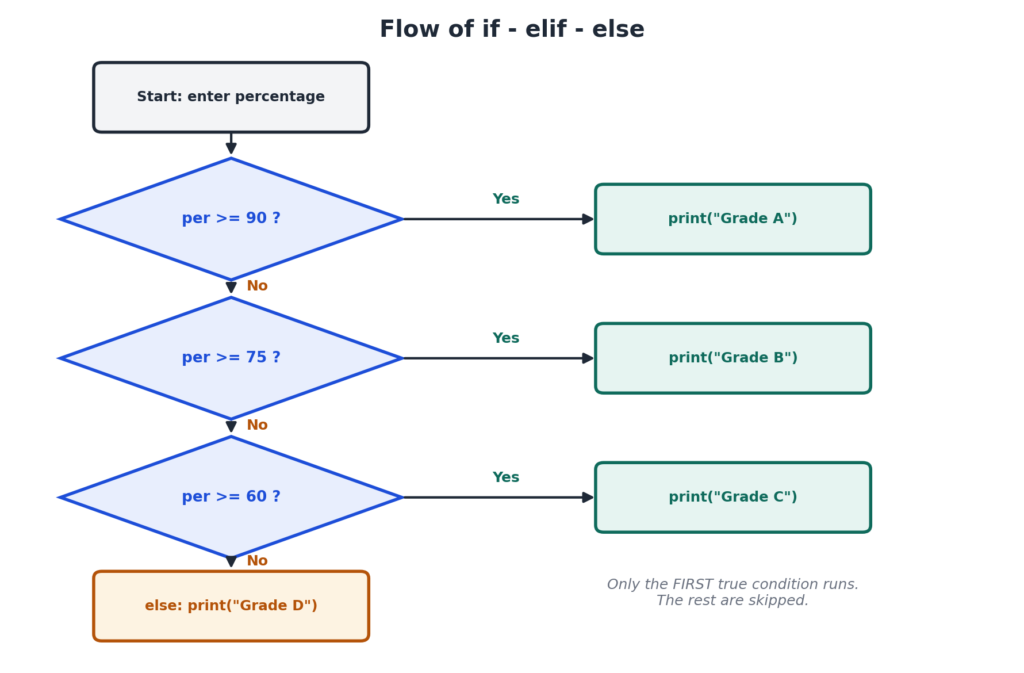
per = 82
if per >= 90:
    print("Grade A")
elif per >= 75:
    print("Grade B")
elif per >= 60:
    print("Grade C")
else:
    print("Grade D")
Output: Grade B
Why? 82 is not 90 or more, so the first check fails. 82 is 75 or more, so Grade B runs, and the rest are skipped.
Nested if
An if inside another if is called a nested if.
num = 0
if num >= 0:
    if num == 0:
        print("Zero")
    else:
        print("Positive")
else:
    print("Negative")
Output: Zero
The for Loop
A for loop repeats a block of code a fixed number of times. It is often used with range().
| Code | Numbers Produced |
|---|---|
| range(5) | 0, 1, 2, 3, 4 |
| range(1, 6) | 1, 2, 3, 4, 5 |
| range(2, 11, 2) | 2, 4, 6, 8, 10 |
Remember: The end number is not included. range(1, 6) stops at 5. The third number is the step.
for i in range(1, 6):
    print(i)
Output:
1
2
3
4
5
The while Loop
A while loop repeats as long as a condition is True. Use it when you do not know in advance how many times to repeat.
i = 1
while i <= 5:
    print(i)
    i = i + 1
Output:
1
2
3
4
5
Warning: If you forget the line i = i + 1, the condition never becomes False, and the loop never stops. This is called an infinite loop. Press Ctrl + C to stop it.
break and continue
- break: Stops the loop completely.
- continue: Skips the rest of this round, and goes to the next round.
for i in range(1, 6):
    if i == 3:
        continue
    print(i)
Output: 1, 2, 4, 5 (each on a new line). The number 3 is skipped.
for Loop vs while Loop
| for Loop | while Loop |
|---|---|
| Used when we know how many times to repeat. | Used when we repeat until a condition changes. |
| Counting is handled by range(). | We must update the counter ourselves. |
| Example: Print numbers 1 to 10. | Example: Keep asking until the user types the right password. |
Python Lists
A list stores many values in one variable. The values are written inside square brackets, separated by commas. A list can hold numbers, text, or both.
fruits = ["apple", "mango", "kiwi", "grape", "plum"]
marks = [78, 85, 62]
Index of a List
Every item has a position number called an index. Counting starts from 0, not 1. You can also count from the back using negative numbers: -1 is the last item.
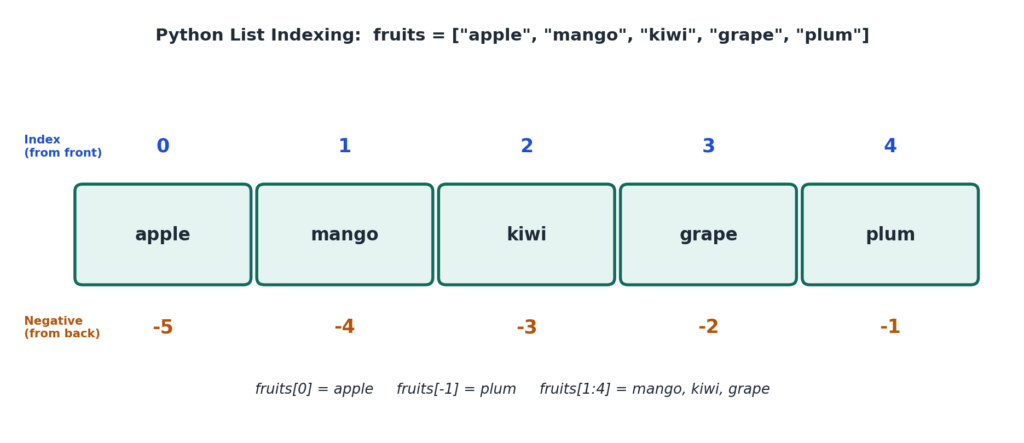
a = [10, 20, 30, 40, 50]
print(a[0])
print(a[-1])
print(a[1:4])
Output:
10
50
[20, 30, 40]
a[1:4] is called a slice. It gives items from index 1 up to, but not including, index 4.
Common List Operations
| Task | Code | What It Does |
|---|---|---|
| Add at the end | list.append(x) | Adds x at the end |
| Add at a position | list.insert(i, x) | Adds x at index i |
| Delete by value | list.remove(x) | Removes the first x |
| Delete by index | list.pop(i) or del list[i] | Removes the item at index i |
| Sort | list.sort() | Sorts in ascending order |
| Reverse | list.reverse() | Reverses the order |
| Length | len(list) | Number of items |
| Sum, largest, smallest | sum(list), max(list), min(list) | For number lists |
| Check if present | x in list | True or False |
| Join two lists | list1 + list2 | Makes a bigger list |
Looping Through a List
fruits = ["apple", "mango", "kiwi"]
for f in fruits:
    print(f)
Output:
apple
mango
kiwi
Practical Programs (17 Programs With Output)
CBSE groups the practical programs under Print, Input, List, and If-For-While. Below are 17 programs in the same groups. You can change the names and numbers to make them your own. Your teacher may give a different list, so follow that when needed.
Tips: Type each program yourself. Do not copy and paste. Type quotes as plain straight quotes ( ” ). Mind the indentation.
Group 1: Print
Program 1: Print Personal Information
print("Name          : Riya Sharma")
print("Father's Name : Mr. Anil Sharma")
print("Class         : 9")
print("School Name   : Sunrise Public School")
Output:
Name          : Riya Sharma
Father's Name : Mr. Anil Sharma
Class         : 9
School Name   : Sunrise Public School
Replace the details with your own.
Program 2: Print a Pattern Using Many print() Statements
print("*")
print("**")
print("***")
print("****")
print("*****")
Output:
*
**
***
****
*****
Group 2: Input
Program 3: Area and Perimeter of a Rectangle
length = float(input("Enter the length: "))
breadth = float(input("Enter the breadth: "))
area = length * breadth
perimeter = 2 * (length + breadth)
print("Area      =", area)
print("Perimeter =", perimeter)
Sample output:
Enter the length: 12.5
Enter the breadth: 4
Area      = 50.0
Perimeter = 33.0
Program 4: Total and Average of Three Subjects
m1 = float(input("Enter marks of subject 1: "))
m2 = float(input("Enter marks of subject 2: "))
m3 = float(input("Enter marks of subject 3: "))
total = m1 + m2 + m3
average = total / 3
print("Total   =", total)
print("Average =", average)
Sample output:
Enter marks of subject 1: 78
Enter marks of subject 2: 85
Enter marks of subject 3: 92
Total   = 255.0
Average = 85.0
Program 5: Convert Celsius to Fahrenheit
c = float(input("Enter temperature in Celsius: "))
f = (c * 9 / 5) + 32
print("Temperature in Fahrenheit =", f)
Sample output:
Enter temperature in Celsius: 37
Temperature in Fahrenheit = 98.6
Group 3: List
Program 6: Science Quiz List
Aim: Make a list of children selected for a science quiz. Print it, add a name, delete the name “Vikram”, and sort the final list in ascending order.
quiz = ["Aman", "Vikram", "Riya", "Zoya", "Kabir"]
print("Original list:", quiz)
print("Number of children:", len(quiz))

quiz.append("Neha")
print("After adding Neha:", quiz)

quiz.remove("Vikram")
print("After deleting Vikram:", quiz)

quiz.sort()
print("Sorted list:", quiz)
Output:
Original list: ['Aman', 'Vikram', 'Riya', 'Zoya', 'Kabir']
Number of children: 5
After adding Neha: ['Aman', 'Vikram', 'Riya', 'Zoya', 'Kabir', 'Neha']
After deleting Vikram: ['Aman', 'Riya', 'Zoya', 'Kabir', 'Neha']
Sorted list: ['Aman', 'Kabir', 'Neha', 'Riya', 'Zoya']
Program 7: Sum, Largest and Smallest of a List
numbers = [12, 45, 7, 23, 56, 31]
print("List    :", numbers)
print("Sum     :", sum(numbers))
print("Largest :", max(numbers))
print("Smallest:", min(numbers))
print("Length  :", len(numbers))
Output:
List    : [12, 45, 7, 23, 56, 31]
Sum     : 174
Largest : 56
Smallest: 7
Length  : 6
Group 4: If, For, While
Program 8: Check Voting Eligibility
age = int(input("Enter your age: "))
if age >= 18:
    print("You are eligible to vote.")
else:
    print("You are not eligible to vote.")
Sample output:
Enter your age: 20
You are eligible to vote.
Program 9: Grade From Percentage
per = float(input("Enter percentage: "))
if per >= 90:
    print("Grade A")
elif per >= 75:
    print("Grade B")
elif per >= 60:
    print("Grade C")
elif per >= 33:
    print("Grade D")
else:
    print("Fail")
Sample output:
Enter percentage: 82
Grade B
Tested with other inputs too: 95 gives Grade A, 60 gives Grade C, 40 gives Grade D, and 20 gives Fail.
Program 10: Positive, Negative or Zero
n = int(input("Enter a number: "))
if n > 0:
    print("The number is positive")
elif n < 0:
    print("The number is negative")
else:
    print("The number is zero")
Sample output:
Enter a number: -5
The number is negative
Program 11: Print the First 10 Natural Numbers
for i in range(1, 11):
    print(i)
Output: The numbers 1 to 10, each on a new line.
Program 12: Print the First 10 Even Numbers
for i in range(2, 21, 2):
    print(i, end=" ")
print()
Output:
2 4 6 8 10 12 14 16 18 20end=" " keeps the numbers on the same line, separated by a space.
Program 13: Sum of the First n Natural Numbers (while loop)
n = int(input("Enter n: "))
total = 0
i = 1
while i <= n:
    total = total + i
    i = i + 1
print("Sum of first", n, "natural numbers =", total)
Sample output:
Enter n: 10
Sum of first 10 natural numbers = 55
Program 14: Multiplication Table
n = int(input("Enter a number: "))
for i in range(1, 11):
    print(n, "x", i, "=", n * i)
Sample output (for 9):
Enter a number: 9
9 x 1 = 9
9 x 2 = 18
9 x 3 = 27
...
9 x 10 = 90
Program 15: Even or Odd
num = int(input("Enter a number: "))
if num % 2 == 0:
    print(num, "is even")
else:
    print(num, "is odd")
Sample output:
Enter a number: 14
14 is even
Program 16: Factorial of a Number (while loop)
n = int(input("Enter a number: "))
fact = 1
i = 1
while i <= n:
    fact = fact * i
    i = i + 1
print("Factorial of", n, "is", fact)
Sample output:
Enter a number: 6
Factorial of 6 is 720
Program 17: Count the Vowels in a Word
word = input("Enter a word: ")
count = 0
for ch in word:
    if ch in "aeiouAEIOU":
        count = count + 1
print("Number of vowels =", count)
Sample output:
Enter a word: Education
Number of vowels = 5
Common Errors and How to Fix Them
| Error | Why It Happens | Fix |
|---|---|---|
| SyntaxError | A bracket, quote, or colon is missing. | Check the line Python points to. Did you put a : after if, for, and while? |
| IndentationError | The spaces at the start of a line are wrong. | Indent all lines inside an if or loop by the same number of spaces. |
| NameError | You used a variable before giving it a value, or you spelled it wrong. | Check the spelling. Python is case-sensitive. |
| TypeError | You mixed types, such as adding a number and text. | Convert with int(), float(), or str(). |
| ValueError | The user typed text where a number was expected. | Type a valid number when the program asks for one. |
Classic mistake: Writing age = input("Age: ") and then if age >= 18:. Because input() gives text, this causes an error. Write age = int(input("Age: ")) instead.
How to Prepare Your Practical File
- Write the aim, the program, and the output for each program.
- Include at least 15 programs, covering all four groups: Print, Input, List, and If-For-While.
- Take a screenshot of the output of each program.
- Be ready to explain any line of your program in the viva.
- Practise writing 3 or 4 programs without looking at the notes. In the practical exam, you may be asked to write any 3 programs on the topics in this unit.
Likely Viva Questions
- What is Python? A simple programming language that is widely used in AI.
- What is a variable? A name that stores a value.
- What does input() return? Text (a string).
- What is the difference between = and ==? = stores a value. == checks if two values are equal.
- What does % do? It gives the remainder after division.
- What is the difference between / and //? / gives the full decimal answer. // gives only the whole part.
- What is indentation? The spaces at the start of a line that show which lines belong inside an if or a loop.
- What is the difference between for and while? For repeats a fixed number of times. While repeats until a condition becomes False.
- What is the index of the first item in a list? 0.
- How do you add an item to the end of a list? With append().
Quick Revision Points
- Python is a simple, free language used a lot in AI.
- A variable stores a value. The = sign is the assignment operator.
- Data types: int, float, str, bool, list. Check with type().
- Arithmetic operators: + – * / // % **.
- Comparison operators give True or False. Logical operators: and, or, not.
- print() shows output. input() takes input as a string. Use int() or float() to convert.
- if, if-else, and elif choose what to run. Indentation matters.
- for repeats a fixed number of times. while repeats while a condition is True.
- range(1, 6) gives 1 to 5. The end number is not included.
- Lists use square brackets, and index starts at 0. append, insert, remove, sort, len.
Multiple Choice Questions
Q1. Python is a:
a) Programming language b) Web browser c) Game d) Chart tool
Answer: a) Programming language
Q2. Which symbol is used to write a comment in Python?
a) // b) # c) /* d) —
Answer: b) #
Q3. Which of these is a valid variable name?
a) 2name b) my-name c) my_name d) class
Answer: c) my_name
Q4. What is the data type of 3.14?
a) int b) float c) str d) bool
Answer: b) float
Q5. What is the data type of “Hello”?
a) int b) float c) str d) list
Answer: c) str
Q6. Which function shows output on the screen?
a) input() b) print() c) type() d) len()
Answer: b) print()
Q7. The input() function always returns:
a) An integer b) A float c) A string d) A list
Answer: c) A string
Q8. Which line takes a whole number as input?
a) n = input(“Enter: “) b) n = int(input(“Enter: “)) c) n = str(input(“Enter: “)) d) n = print(“Enter: “)
Answer: b) n = int(input(“Enter: “))
Q9. What is the output of print(7 // 2)?
a) 3.5 b) 3 c) 4 d) 1
Answer: b) 3
Q10. What is the output of print(7 % 2)?
a) 3 b) 3.5 c) 1 d) 0
Answer: c) 1
Q11. What is the output of print(2 ** 3)?
a) 6 b) 5 c) 8 d) 9
Answer: c) 8
Q12. What is the output of print(10 + 5 * 2)?
a) 30 b) 20 c) 25 d) 15
Answer: b) 20
Q13. What is the output of print("5" + "3")?
a) 8 b) 53 c) 15 d) Error
Answer: b) 53
Q14. Which operator checks if two values are equal?
a) = b) == c) != d) =>
Answer: b) ==
Q15. What is the output of print(5 > 3 and 2 > 4)?
a) True b) False c) 5 d) Error
Answer: b) False
Q16. After x = 10 and x += 5, the value of x is:
a) 5 b) 10 c) 15 d) 50
Answer: c) 15
Q17. What does range(1, 6) produce?
a) 1 to 6 b) 1 to 5 c) 0 to 5 d) 2 to 6
Answer: b) 1 to 5
Q18. Which loop is used when we repeat while a condition is True?
a) for b) while c) if d) range
Answer: b) while
Q19. What is the index of the first item in a list?
a) 1 b) -1 c) 0 d) 10
Answer: c) 0
Q20. For a = [10, 20, 30, 40, 50], what is a[-1]?
a) 10 b) 40 c) 50 d) Error
Answer: c) 50
Q21. Which method adds an item at the end of a list?
a) insert() b) append() c) remove() d) sort()
Answer: b) append()
Q22. Which method arranges a list in ascending order?
a) sort() b) remove() c) append() d) len()
Answer: a) sort()
Assertion and Reason Questions
Choices: (a) Both A and R are true and R explains A. (b) Both A and R are true but R does not explain A. (c) A is true but R is false. (d) A is false but R is true.
Q23. Assertion (A): We write int(input("Enter age: ")) to take a number from the user.
Reason (R): The input() function always gives a string, which must be changed to a number for maths.
Answer: (a) Both are true, and R explains A.
Q24. Assertion (A): Indentation is optional in Python.
Reason (R): Python uses indentation to show which lines belong inside an if or a loop.
Answer: (d) A is false, because indentation is required. R is true.
Case-Based Question
A shopkeeper writes a program. It asks for the price of one item and the number of items. It finds the total bill. If the total is more than 1000, it gives a discount of 10%, and then prints the final bill.
- Which function will take the price from the user? Answer: input(), with float() around it to change it to a number.
- Which statement will check if the total is more than 1000? Answer: The if statement, like
if total > 1000:. - Write one line to calculate the total. Answer:
total = price * quantity. - Write one line to apply the 10% discount. Answer:
total = total - total * 10 / 100.
Short Answer Questions
- What is Python? Give two reasons why it is good for AI.
- What is a variable? Write three rules for naming a variable.
- Name the five data types in this unit, with one example of each.
- What is the difference between
/and//? What does%do? - What is the difference between
=and==? - Name the logical operators. What does each do?
- Why do we use int() or float() with input()?
- What is indentation? Why is it important?
- What is the difference between a for loop and a while loop?
- What does
range(2, 11, 2)produce? - What is an infinite loop? How can it be stopped?
- Name any four list operations.
- Predict the output:
x = 5; y = 2; print(x // y, x % y, x ** y). (Answer: 2 1 25.) - Predict the output:
for i in range(1, 4): print(i * i). (Answer: 1, 4, 9, each on a new line.)
Long Answer Questions
- Explain the different types of operators in Python, with examples.
- Explain the if, if-else, and if-elif-else statements, with a program for each.
- Explain the for loop and the while loop. Write a program to print the multiplication table of a number using each.
- Explain lists in Python. Describe indexing and any five list operations with examples.
- Write a program to make a list of five names, add one name, delete one name, and sort the list. Show the output.
Keep Learning
You have finished all 5 units of Class 9 AI. Visit the Class 9 AI Notes page to see all units in one place. When you are ready for the next level, learn Jupyter Notebook, NumPy, Pandas, and more in Class 10 Unit 7: Advance Python.